August 20, 2026
Introducing Spline V2
A full redesign of our 3D editor on WebGPU, now open to AI agents.
Faster performance, advanced materials, and an agent that builds scenes.
Spline's 3D editor got a big redesign today.
We shipped a complete rebuild of our 3D editor, for the agentic era. This includes the release of AI agents, WebGPU, a new UI, MCP and more!
Let's explore each of the major changes shipped today.
Spline AI Agent
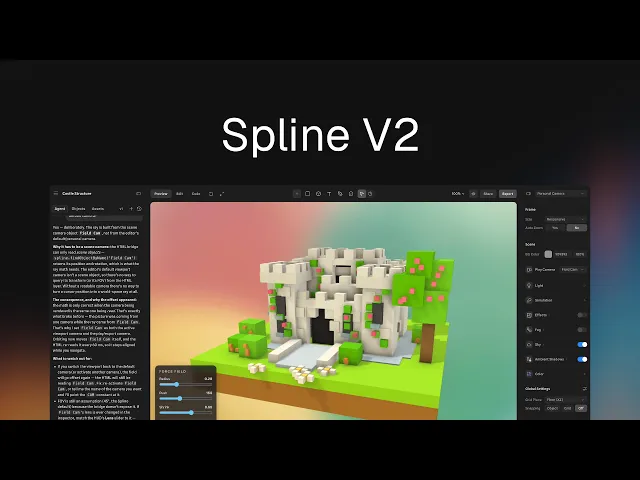
In the sidebar, you can now find the Agent tab. It works through the same design system as other creators in Spline: reading the scene, running the editor's own tools, and taking screenshots to check its work as it goes.
There's very little it can't touch: objects, materials, lights, cameras, booleans, particles, cloners, lathes, sky and variables, plus interactivity through events and states. That last part matters most. It can build a scene that reacts to input, not just one that looks right.
It writes code, too. Where something is easier expressed in code than in the scene graph, it generates the HTML and JS to do it and wires that into the scene.
For layout it doesn't have to guess coordinates. Alongside procedural generators, the agent can hand an arrangement to a constraint solver, saying how objects should relate (near, apart, on top of, against, facing) and letting the solver work out where everything goes.
It doesn't have to be our agent, either. An MCP server lets Claude Code, Cursor, ChatGPT and others drive the editor through the same tools.
The AI agent building a 3D scene from scratch
Choose the Mode: Edit, Code, Preview
The editor now works in three modes. Edit is the canvas. Code is a proper code editor, with syntax highlighting, Spline API completions and autosave. Preview plays the whole thing, scene and HTML/JS together.
Code isn't only for the agent. A new HTML overlay layers HTML and JS over the canvas, with a bridge into the scene, so motion, interactivity and whole games can be built in code rather than through the graph.
This also works for everything around the 3D scene: UI, logic, game loops.
The AI agent generates code for UI, logic and game loops
Rebuilt on WebGPU
Spline's renderer has been rebuilt on WebGPU which is now the default, with WebGL as a fallback.
It's faster overall: scenes draw with far less overhead, so heavier files stay interactive, more objects can sit on screen at once, and files reach their first frame quicker. It's also what makes the new lighting, reflections and simulation features possible in real time.
Advanced Materials: PBR, Sky, and Dust
Materials got a full PBR pass, with image-based lighting and an HDR color pipeline, so models keep their shading when they come in from other tools.
A new reflection layer adds screen-space reflections on WebGPU, plus a Mirror toggle for true planar mirrors.
Two new skies are available: Physical Sky, procedural with its own dome light and intensity dial, and HDRi Sky, which uses an HDR image as the environment, with a switch to keep the lighting but hide the backdrop. Height fog joins classic depth fog and responds to camera angle.
Two new material layers have been introduced: Dust, which accumulates dust or snow on upward-facing surfaces, and Vertex Color, for models that carry their color in the mesh.
Improved PBR and HDR support
New Modeling Tools
Introducing a new Bevel/Chamfer tool with round mode, segment control, a live-updating toolbar and smarter edge-loop selection. Texture projection gained axis control for cylindrical and spherical modes. Sculpting gained brush symmetry, and UVs now work on sculpted and editable meshes.
Shape blend was rebuilt from scratch with much higher resolution, faster, and any mesh can now be a source.
On top of all this, the new Hair System grows hair from a scalp shape or any mesh, with lighting, shadows, wind and clumping.
Improved Performance
Booleans were rewritten from the ground up: around 4× faster, and reliable on the geometry that used to break them. Cloners draw far more efficiently, so scenes with lots of repeated objects stay smooth.
Beyond that: faster ambient occlusion, faster selection, faster tessellation, better shadow performance, improved physics contacts, and a long list of memory and idle-time fixes.
Exports are smaller too. The base runtime shrank, and its size adapts to what a scene actually uses, so scenes load faster.
AI generated and code powered experiences made with Spline
New Desktop App & MCP
We rebuilt the desktop app from the ground up, and it replaces the old one in place, on macOS and Windows. Scenes open as real tabs, each isolated so a heavy one can't take the app down, and background tabs aren't throttled, so a render keeps going while you model in another. Hana files sit in the same strip so you can work on both editors at the same time.
It's also how agents connect via the new Spline MCP without setup. Launch the desktop app alongside your AI tool of choice (Claude Code, Claude Desktop, ChatGPT, Cursor, VS Code, Antigravity) and Spline detects it automatically. Ask for something and a tab indicator lights up while it works.
Creating a Spline scene with Claude Code via Desktop app MCP
Start building now
Spline V2 is one of the major releases we ever made. Heavier scenes stay performant, more objects sit on screen at once, booleans are faster, and exports are smaller.
On top of that there's far more range in how a scene can look, from PBR materials and real reflections to skies, fog, dust and hair.
And it isn't only up to you to drive any more. The same file can be opened by you, built on by an agent while you're somewhere else, and extended with code the agent can write for you.
All of it is live today. Download the desktop app or open Spline in your browser.
The Spline Team 🌸